Missed Call
Overview
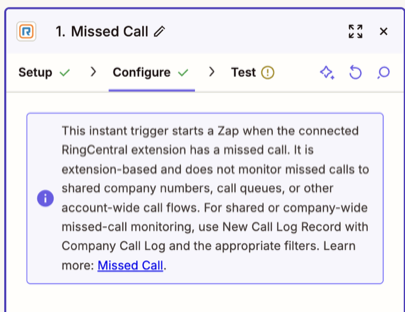
Use this instant trigger to start a Zap when the RingCentral extension connected to the Zap has a missed call. It is extension-based; it does not provide an account-wide scope for shared company lines or call queues.
Configure
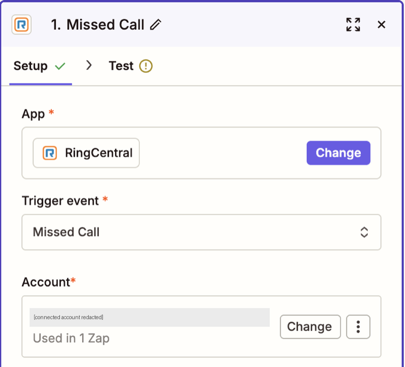
Add Missed Call as the trigger and connect the RingCentral extension you want to monitor.
Choose the Right Trigger
For polling-based missed-call monitoring, use New Call Log Record. It supports extension-level or company-wide scope, including shared numbers and call queues; its guide covers access requirements and filters. Polling runs on Zapier's schedule rather than immediately.
Output
The Missed Call trigger can return call-event details as separate Zapier fields. Available fields and values depend on the event and connected extension; extension fields can show No Data when no RingCentral extension is associated.
Call Details
- Direction: Call direction, such as Inbound.
- Event Time: Date and time of the call event.
- Result: Call outcome, such as No Answer or Voicemail.
- Type: Event type. The sample shown is
Call.
Basic Call Information
- Session ID: Identifier for the call session.
- Telephony Session ID: Identifier for the telephony session.
Participant Information
From (Caller)
- From Phone Number and Name: Combined caller number and display name, when available.
- From Name: Caller name, when available.
- From Phone Number: Caller phone number.
- From Extension Number: Caller extension; this may show
No Datafor external callers.
To (Recipient)
- To Phone Number and Name: Combined recipient number and display name, when available.
- To Name: Recipient name, when available.
- To Phone Number: Recipient phone number.
- To Extension Number: Recipient extension; this may show
No Datawhen unavailable.
Raw Data
This page does not include an unprocessed JSON payload for the instant event. For raw call-log API data and detailed-view options, use New Call Log Record and select Detailed view.
Sample Output
This illustrative example uses synthetic values for an inbound missed call. Test the trigger in Zapier to confirm the exact fields and values available to your connected extension.
{
  "direction": "Inbound",
  "eventTime": "2026-01-15T10:32:00.000Z",
  "from": "+15551230001 (Caller)",
  "result": "No Answer",
  "sessionId": "example-session-id",
  "telephonySessionId": "example-telephony-session-id",
  "to": "+15551230002 (Support)",
  "type": "Call",
  "toExtensionNumber": "No Data",
  "toName": "Support",
  "toPhoneNumber": "+15551230002",
  "fromExtensionNumber": "No Data",
  "fromName": "Caller",
  "fromPhoneNumber": "+15551230001"
}