New Voicemail
Overview
Use this instant trigger when a RingCentral extension receives a new voicemail. The trigger returns voicemail metadata, caller and recipient fields, the voicemail audio attachment, and transcript-related fields when Voicemail to Text is available.
RingCentral admins can monitor up to 50 selected extensions. If no extensions are selected, the trigger monitors the connected user's extension.
Configure
-
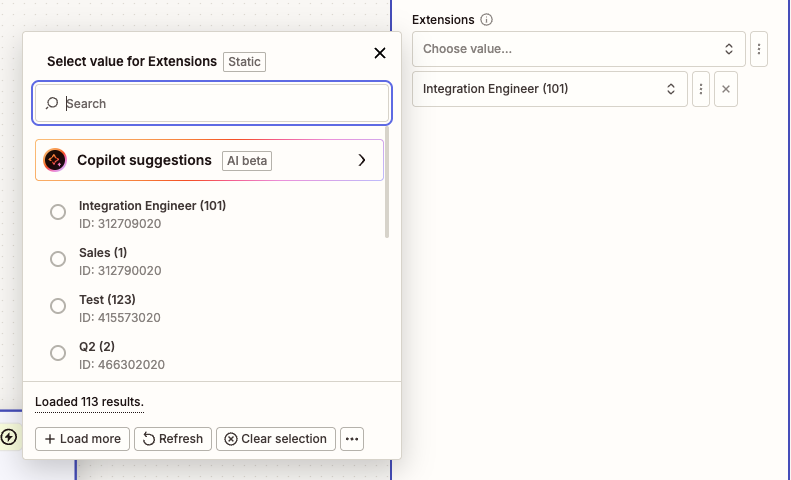
Extensions (Optional): Search by extension number or name and select one or more extensions to monitor.
Admin users can select up to 50 extensions. If no extensions are selected, the trigger monitors the connected user's extension.
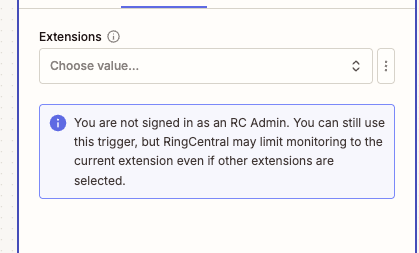
If the connected user is not a RingCentral admin, RingCentral may limit monitoring to the current extension even if other extensions are selected. A warning is shown in the Zap configuration.
Trigger Behavior
The trigger only returns voicemail records that include an audio recording attachment.
Voicemail to Text must be enabled for the user who receives the voicemail before transcripts can be generated. If Voicemail to Text is not enabled, the Zap can still trigger for new voicemails, but transcript fields may be empty or unavailable.
When Voicemail to Text is enabled, the trigger tries to avoid firing before transcription is ready. It tries to wait until the voicemail transcription reaches a final status before returning the voicemail. Because transcription is generated asynchronously, Zap delivery may be delayed by a few minutes.
Final transcription statuses include:
- Completed
- CompletedPartially
- Failed
- TimedOut
- NotAvailable
Output
The trigger returns fields commonly used for voicemail workflows.
Voicemail Information
- ID: RingCentral voicemail message ID.
- Creation Time: Date and time the voicemail was created.
- Direction: Message direction. For this trigger, this is inbound.
- Message Content: Transcript file or transcript-related content when an audio transcription attachment is available.
- Message Context Text (
messageContextText): Plain text transcription content when available. For now, this is the actual output field to use for voicemail transcript text. - Priority: Message priority.
- Voicemail Transcription Status: Final transcription status.
- Transcript (
transcript): Transcript field shown by Zapier. In the current release, usemessageContextTextfor the actual transcript text. A future release is expected to maketranscriptandmessageContextTextreturn the same transcript text.
Participant Information
From (Caller) Information
- From Name: Caller name, when available.
- From Phone Number: Caller phone number.
- From Extension Number: Caller extension number, when available.
- From Phone Number and Name: Combined caller phone number and name.
To (Recipient) Information
- To Name: Recipient name, when available.
- To Phone Number: Recipient phone number.
- To Extension Number: Recipient extension number, when available.
- To Phone Number and Name: Combined recipient phone number and name.
Attachment Information
- Attachment ID: Attachment identifier.
- Attachment File: Downloadable voicemail audio file.
- Attachment Type: Attachment type, typically audio recording.
- Attachment Content Type: MIME type for the voicemail audio file.
- Attachment Size: File size when available.
- Attachment Filename: File name when available.
- Attachment Duration: Voicemail duration when available.
Sample Output
{
  "id": 402406986008,
  "creationTime": "2025-09-17T00:15:32.637Z",
  "direction": "Inbound",
  "messageContent": "Sample Transcript File",
  "messageContextText": "Hi, please call me back when you have a chance.",
  "priority": "Normal",
  "vmTranscriptionStatus": "Completed",
  "from": "+18883770028 (John Doe)",
  "fromExtensionNumber": "No Data",
  "fromName": "John Doe",
  "fromPhoneNumber": "+18883770028",
  "to": "+16508783254 (Support)",
  "toExtensionNumber": "12345",
  "toName": "Support",
  "toPhoneNumber": "+16508783254",
  "attachments": [
    {
      "id": 402406986008,
      "type": "AudioRecording",
      "contentType": "audio/x-wav",
      "filename": "voicemail.wav",
      "vmDuration": 42,
      "file": "Sample Voicemail Audio File"
    }
  ]
}
Transcript Availability
Transcript fields depend on Voicemail to Text being enabled for the user and on the transcription status for the message. If the final transcription status is Failed, TimedOut, or NotAvailable, the voicemail can still trigger, but transcript text may be empty.