View Contact And Log Details
App Connect can open the corresponding CRM contact or activity page for matched contacts and logged calls.
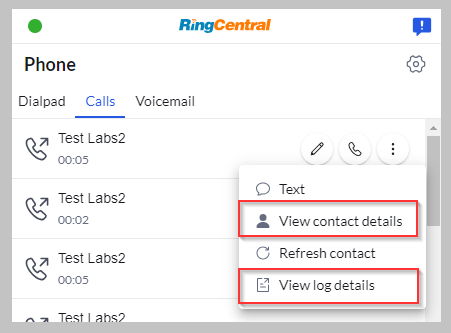
Configure this in the platform manifest:
| Field | Description |
|---|---|
canOpenLogPage |
When true, logged activities open logPageUrl. When false, they open contactPageUrl. |
contactPageUrl |
Contact URL template. Supports built-in URL tokens and custom setting tokens. |
enableFallbackContactPageUrl |
Enables the call-pop fallback URL when no existing contact is matched. |
fallbackContactPageUrl |
Fixed URL opened by call-pop when fallback is enabled and no existing contact is matched. Supports built-in URL tokens and custom setting tokens. |
logPageUrl |
Activity/log URL template. Supports built-in URL tokens and custom setting tokens. |
Example:
{
  "canOpenLogPage": true,
  "contactPageUrl": "https://{hostname}/contacts/{contactId}",
  "enableFallbackContactPageUrl": true,
  "fallbackContactPageUrl": "https://{hostname}/contacts",
  "logPageUrl": "https://{hostname}/activities/{logId}"
}
Values come from connector responses:
contactIdandcontactTypecome from contact lookup or log submission data.logIdcomes fromcreateCallLogorcreateMessageLog.hostnamecomes from the connected user record.- Custom setting tokens come from the merged user/admin settings object. Use the setting item
iddirectly, for example{contactBoardId}readsuserSettings.contactBoardId.value.
For example, a connector can define a custom setting for a Monday.com contacts board:
{
  "settings": [
    {
      "id": "mondayOptions",
      "type": "section",
      "name": "Monday options",
      "items": [
        {
          "id": "contactBoardId",
          "type": "inputField",
          "name": "Contact board ID"
        }
      ]
    }
  ],
  "contactPageUrl": "https://{hostname}/boards/{contactBoardId}/pulses/{contactId}",
  "logPageUrl": "https://{hostname}/boards/{contactBoardId}/pulses/{logId}"
}
The fallback contact page URL is only used by call-pop. Manual view-contact actions keep the existing behavior and do nothing when no existing contact is matched.